litpm for macOS
Run your agents in parallel.
Stay calm.
litpm is a Mac app for the agents you already run. The plan is a folder of markdown files, agents can write code in a worktree of their own, and whatever needs you waits in one inbox.
For macOS. Free for 7 days, with no card, no account and no email.
- Claude Code
- Codex
- Cursor
- Gemini CLI
- Grok Build


A film of about a minute, made from the litpm app itself. It opens on six terminal tabs and a TODO.md: three terminal windows, agents working in each, tabs turning amber as they wait, notifications piling up, faster and louder, until everything stops. After a moment of silence the litpm mark draws itself to four notes, and the name lands. Issue NW-5 is a markdown file: its status is changed in the file, and the app follows. Claude Code is mentioned in a comment and starts on a branch of its own, and three more chats with Codex and Claude Code appear in the sidebar. From the menu bar, Option Space opens the inbox, and one key allows the test run. Claude Code reads, edits and runs the tests; the diff is committed, pushed and opened as pull request 212, with its checks passed. Then the engines litpm works with, Claude Code, Codex, Cursor, Gemini CLI and Grok Build, gather into the litpm mark, and the name: litpm, a calm home for your coding agents.
Six terminal tabs and a TODO.md.
That is how most work with coding agents is run today. It holds for one agent on one task, and then it does not.

- The plan
- Today A TODO.md the agent rewrites, or a prompt lost in scrollback.
- With litpm An issue per piece of work: a markdown file with a status, a priority and its comments.
- The runs
- Today One tab each. Which one is waiting for you?
- With litpm Every agent’s work in one list, and whatever waits on you in one inbox.
- The result
- Today A diff in a worktree you have to find, and the reasoning gone when the session ends.
- With litpm The diff, the commit and the pull request beside the thread that made them.
Issues
The plan is a folder you own.
Every issue is a markdown file with a status, a priority and its comments. Edit it in litpm or in your editor, and the other follows. Your agents read and write the same files with the litpm CLI.

---
title: "Checkout totals ignore the volume discount"
status: todo
priority: urgent
labels: [bug, customer]
milestone: checkout
parent: NW-1
assignee: Margaret
due: 2026-10-09
created: 2026-10-07
---
Ordering 40 cases of Chai shows the list price at checkout; the invoice later applies the 12% discount. Two customers called about it this week.

## Comments

### 2026-10-10 10:17 - Margaret

Reproduced: the discount tiers are read from the old price list. Fix is in the pricing service.- Lists, filters and saved views, made for the keyboard: C makes an issue, / finds one.
- Keep it in git, or in any folder. Edit a file in any editor and litpm shows the change at once.
- Projects and initiatives: milestones, updates with a health, and a graph of where each project is heading, in files like the issues.
Chats3 waiting
Mention an agent. In a repository, it works on a branch of its own.
Type @ on an issue, or start a chat with no issue at all. litpm starts the program you already run, with your own login. In a git repository a Code chat gets its own branch and worktree, so two agents do not step on each other, or on you.

- From supervised to full access: you pick how much it may do, and what it asks waits in the thread.
- Queue your next message, or send it now to cut in while it works. A chat picks its session up again, after litpm restarts too.
- A chat becomes an issue: create one from a chat, or attach the chat to one, and a Code chat’s branch takes the issue’s name.
Inbox3
Everything that needs you, in one list.
Approvals, questions and plans from every agent litpm runs, in every workspace, and the finished turns you have not read yet. Answer with a key, take it back if you were wrong, and get on with your day.


- ⌥ Space opens it from any app, in a popover from the menu bar.
- 1–9 answer, J K move, and U takes an answer back in its first two seconds.
- A notification when an agent starts waiting, so nothing waits on you unseen.
Changes
Review it. Commit it. Open the pull request.
A Code chat’s diff waits in its Changes pane, beside the thread that made it: its steps, the tests it ran and its answer. Commit and push from there, open the pull request, and see its checks.
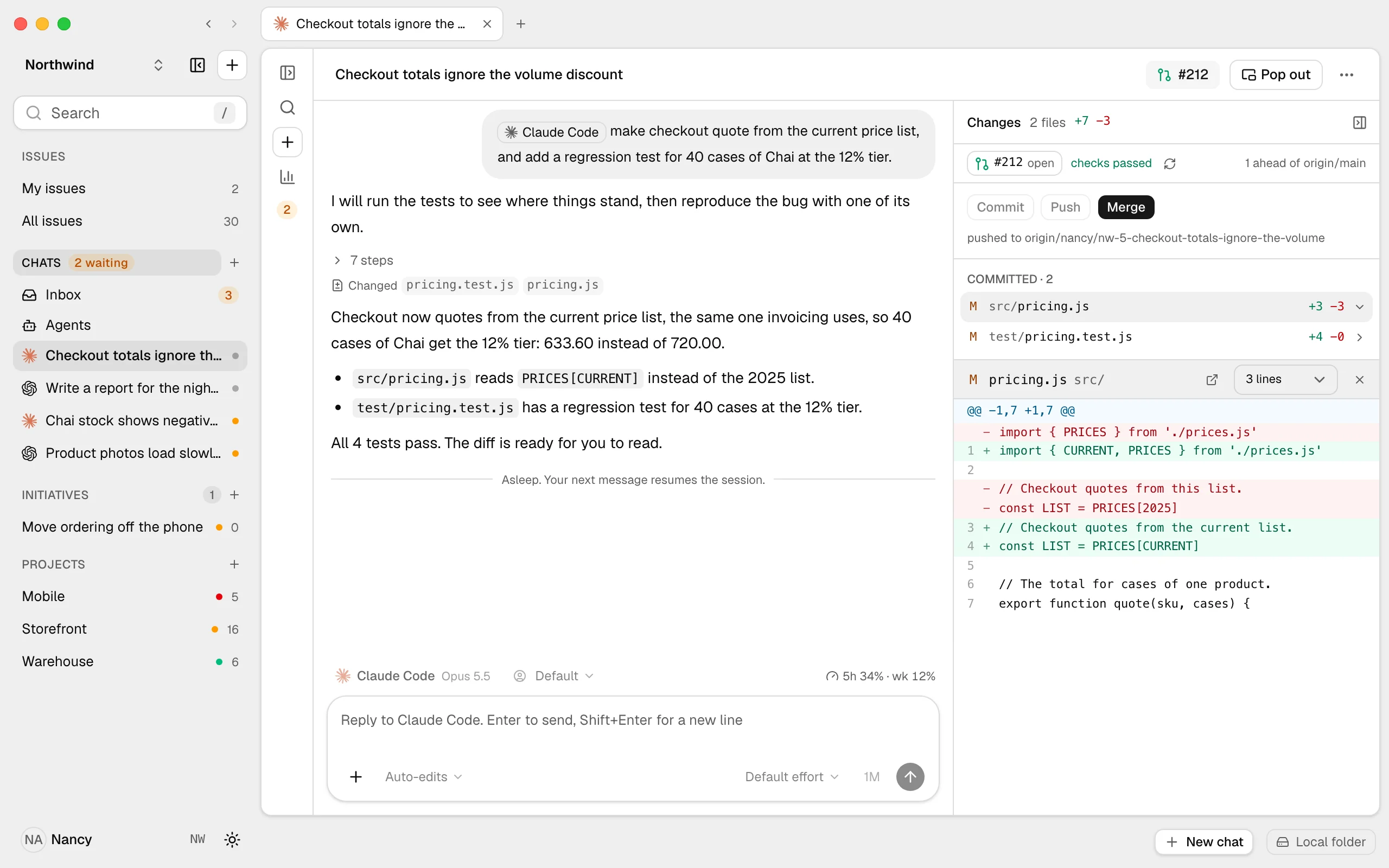
- Commit, push and open the pull request from the Changes pane, beside the thread that made them.
- Commits on the issue: a branch, commit or pull request that names it shows on it, and with one switch on,
Fixes NW-5closes it once it lands on main. - The reasoning stays with the change: the thread that made it is still there, beside its diff, when the run is over.
Agents
The agents you already run.
The Agents hub lists the engines on your Mac with their versions and accounts, and for Claude Code, Codex and Grok Build what each one loads, from instructions and skills to hooks and plugins. Make agents of your own, and workflows that put one to work when something happens.

- Agents of your own: instructions, skills and the engines they run on, then mention one like any program.
- Workflows start from templates: when an issue moves to Done, an agent drafts the status update, and it waits in your Inbox.
- Tidy up finds the skills not used in 30 days and the copies kept in several places.
Accounts
Work and personal, signed in at once.
Add a second Claude Code or Codex login and each lives in a folder of its own, all signed in at the same time. Pick the account for each chat, see how much of its usage limits is used beside the chat box, and switch when one runs low.
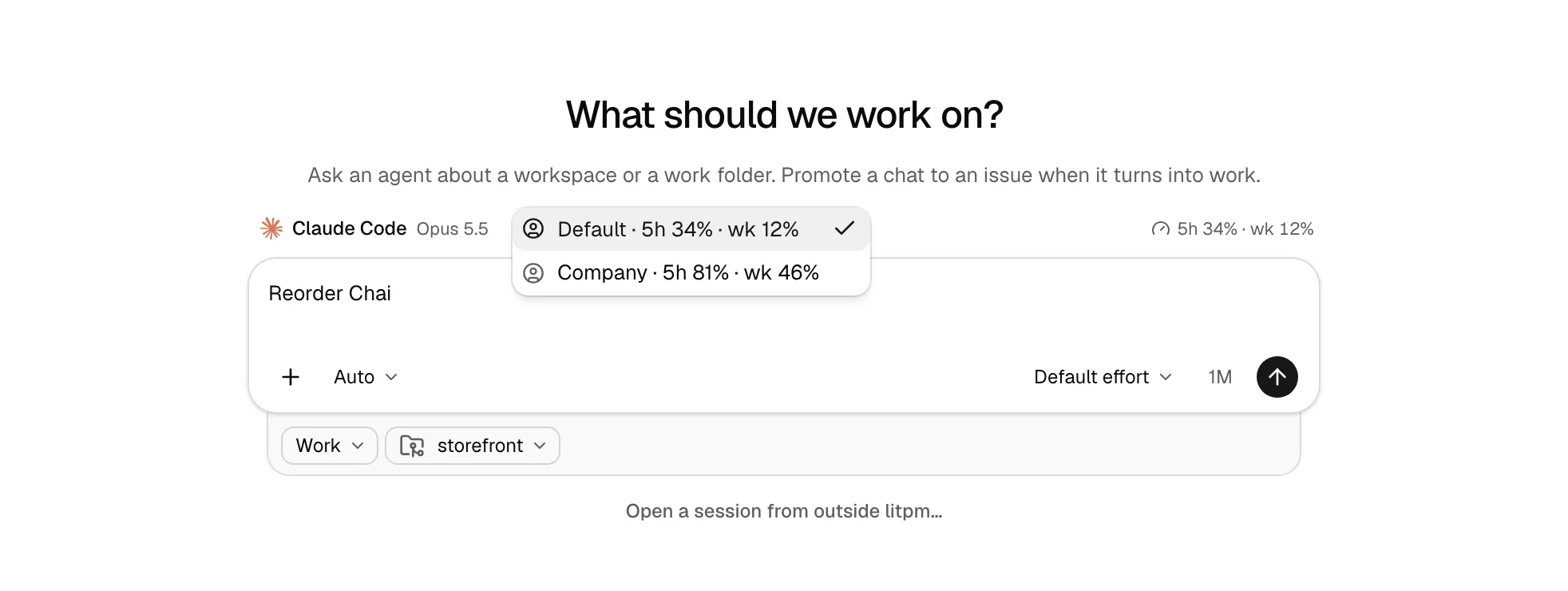
- Add and sign in from the Agents hub, without a terminal: the program’s own sign-in, in the new account’s folder.
- Logins you made by hand, a
~/.claude-workbehind an alias, are found, and Add as an account takes each as it is. - litpm never reads or stores a login’s credential. Each program keeps its own, where it always does.
Also in litpm.
Visual replies
An agent can answer with a chart, a table or a mockup, drawn in the thread, and in a chat, a click on a choice answers it.
One box for everything
⌘ T opens a new tab: go to a page, find an issue or a chat in any workspace, or ask an agent.
Skills in one list
Every skill Claude Code, Codex and Grok Build load, and the workspace’s, with where it loads and how often it was used in 30 days.
The same from a terminal
litpm issues, show, set and comment read and write the same files, for you and your agents, with no server running.
Local-first. Nothing hidden.
Your agent
litpm sells no tokens and wraps no model. It starts the program you already pay for, with your own login, and adds the litpm CLI and a few short instructions, which you can see and switch off.
Your files
Markdown with a little frontmatter. Read them, grep them and keep them in git, with or without litpm.
Your working copy
In a git repository, a Code chat gets a branch and a worktree of its own, so your checkout stays as you left it.
Your data
No account, no cloud service and no analytics. What litpm sends, and to whom, is all on the privacy page.
Free for 7 days. Then $2.99 a month, or pay once.
The whole of litpm from the first launch, with no card, no account and no email. Your issues stay plain files on your disk, whatever you pick.
Monthly
$2.99a month
Cancel any time. litpm keeps working to the end of the month you paid for.
Buy MonthlyLifetime
One payment
- $9
- $14
- $19
- $24
- $29
- $34
- $39
$9 for the first 25, then $5 more every 25 sold, up to $39. Every update, for good.
Buy LifetimeDownload litpm
Or the command-line binary: Mac (Apple silicon) or Mac (Intel).
macOS stops the first open, since litpm is not notarized yet: allow it in System Settings › Privacy & Security › Open Anyway.
Both plans have every feature and every update, on 2 machines. Prices are in US dollars, and tax is added at checkout. Polar takes the payment and emails your license key. For a team, the team version comes later.
Questions.
Which agents does it work with?
Claude Code, Codex, Cursor, Gemini CLI and Grok Build run inside litpm: the thread, the approvals and the diff are on the page. OpenCode, Aider, OpenClaw and any other command open in a terminal on the issue. Each is the program you already have installed, with your own login.
Is it only for code?
No. Mention an agent on any issue, or start a chat with no issue, and ask for a plan, a draft or a review; an answer on an issue comes back as a comment on it. When the work folder is a git repository, a Code chat also gets its own branch and worktree, and the diff and the pull request are beside the thread.
Does it run on Windows or Linux?
Not yet. litpm runs on macOS, Apple silicon and Intel.
macOS won't open it. What do I do?
litpm is not notarized by Apple yet, so macOS stops it the first time with a warning. Open System Settings › Privacy & Security, find the line about litpm near the bottom and click Open Anyway. From then on it opens like any other app. The command-line binary is stopped and allowed the same way.
Is there a free trial?
Yes. 7 days of the whole of litpm from first launch, with no card, no account and no email. litpm sends an anonymous, one-way ID of the machine, never a serial number or anything personal, so the trial runs once per machine and a reinstall does not restart it. After it, litpm stops until you pick a plan, and your issues stay plain files on disk.
How much does litpm cost?
$2.99 a month, or Lifetime for one payment, from $9 to $39 depending on how many have sold. Both have every feature and every update, on 2 machines. Prices are in US dollars, and tax is added at checkout.
How does the Lifetime ladder work?
The first 25 Lifetime licenses are $9 and the next 25 are $14, then $19, $24, $29 and $34, and every license from the 151st on is $39. The count on litpm.app/#pricing comes from real sales and moves only when one sells. You pay the price shown at checkout.
How many machines can I use it on?
Two Macs per license. Paste the key into Settings › License, or run litpm activate <key>. litpm deactivate, or the customer portal, frees a machine's place for another.
How do I cancel?
In Polar's customer portal, polar.sh/litpm/portal. litpm keeps working until the end of the month you paid for.
What does litpm send?
To us and the companies we work with: an anonymous machine ID, to litpm.app, while the trial runs and while a license key is on the machine, and after a trial that ended without a key until litpm.app has answered once; the license key, to Polar, to activate it and to check it once a day; and the desktop app's update check, to GitHub. litpm also talks to the git hosts of your own repositories: git fetches and pushes where there is a remote, and a work folder on GitHub or GitLab is asked for its pull requests. No analytics in litpm itself; litpm.app counts page views with Umami, without cookies. The details are at litpm.app/privacy.
A calm home for your coding agents.
The plan in files you own, every agent’s work in one list, and whatever needs you in one inbox.
For macOS. Free for 7 days, with no card, no account and no email.